这两天解决了几个环境的问题,觉得自己对于http请求在请求过程中是如何流传的,以及Nginx的反向代理功能有了更深的认识。
写出来正好可以梳理一下思路。但是目前只是有一个大体的认识,所以英文标题为small talk,就是聊聊自己的看法,千万带着质疑的态度看,因为没准会有各种纰漏呢ε=ε=ε=┏(゜ロ゜;)┛
一个http请求的一生
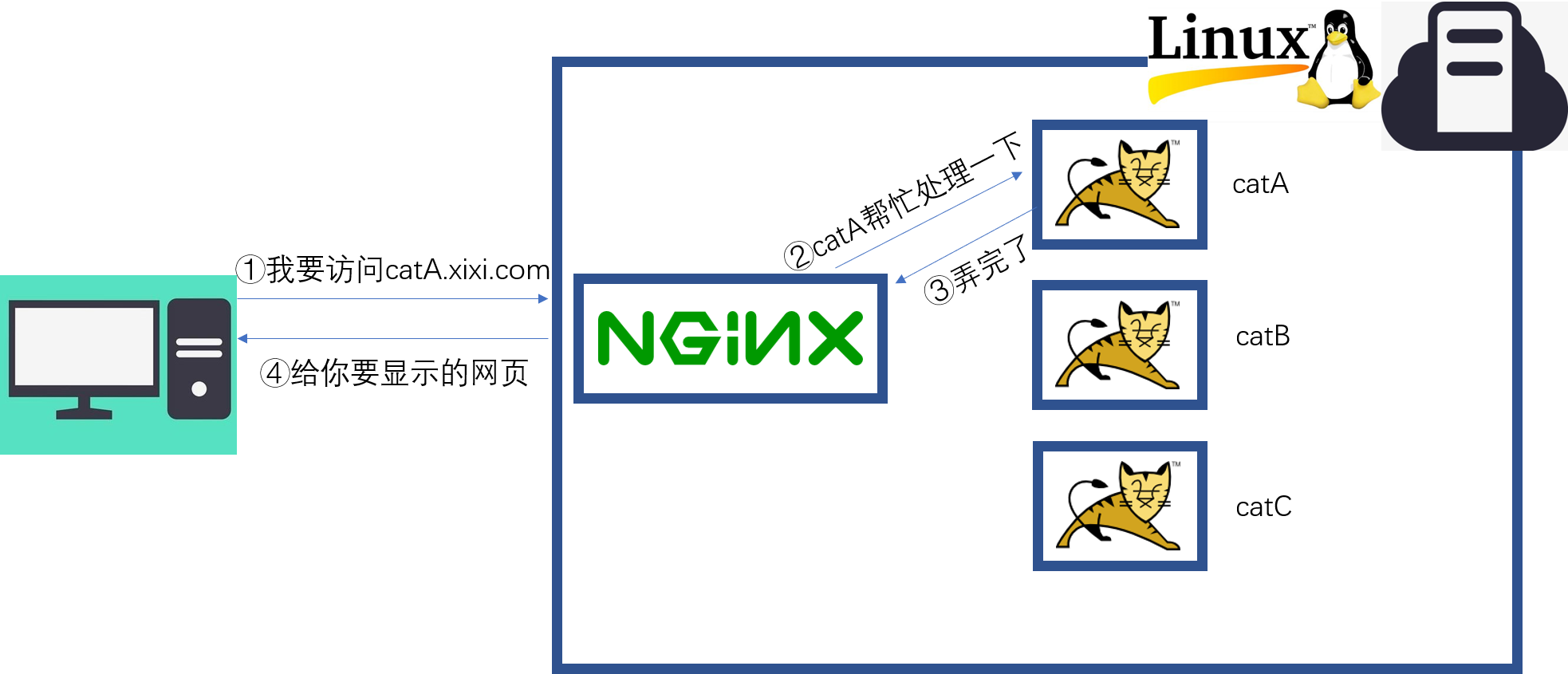
标题开的有点大,细节东西太多了,不过如果是Linux+Nginx+Tomcat的话,大体上符合下面图的样子。
这里要说明一下,这个图是按照俺们公司的测试环境绘制的,实际线上环境的话,nginx可能是单独的一台服务器,不止实现反向代理,还有缓存负载均衡等功能。而相应的tomcat服务也会部署到不同的服务器上。甚至catA会同时存在数个为了应付高并发的情况。
为什么可以通过域名访问到服务器?
首先我们看第一步①我要访问catA.xixi.com。为啥在浏览器输入了catA.xixi.com之后,浏览器就会把请求发送到指定的服务器上呢?
测试环境的话,就要归功于hosts的配置了,一般都用SwitchHosts来进行配置,配置好之后当浏览器要访问的时候会先去配置中看下是否有有指定的服务器ip地址,如果有的话,请求就直接打给这个服务器了。
那么为啥我访问www.jd.com买东西的时候不用配置hosts呢?难道我们每个人的PC都记住了全世界网站服务器的ip地址吗?
当然不是啦,这里要说一下,其实互联网在发展之初是没有域名这个概念的,两台计算机在通信的时候都是通过ip地址去找对方的,但是这也太麻烦了吧,对人类很不友好,记不住啊。所以域名以及DNS(Domain Name Server,域名服务器)也就应运而生了。当我们让浏览器访问www.jd.com的时候,计算机会去DNS上查找这个域名对应的ip地址,然后发请求发出去。不过由于测试环境的域名不会注册到DNS上,所以就要通过配置hosts来进行访问了。
Nginx是如何接到请求的?又是怎么找到catA的?
这就要读一下Nginx的配置文件了,路径在可能在/services/nginx/conf/nginx.conf。不过为了方便管理,还是习惯在该文件的最后加上一句话include domains/*,这样就可以在/services/nginx/conf/domains/下针对不同域名维护不同的配置文件了。要是人工维护的话怎么都行,要是通过程序维护的话,这种分割显然更加的合理。
ok那我们假定/services/nginx/conf/domains/下有如下文件。
1
2
3

catA.xixi.com
catB.xixi.com
catC.xixi.com
看一下配置文件catA.xixi.com的内容:
1
2
3
4
5
6
7
8
9
10
11
12
13
14
15
16
17
18
19
20
21
22
23
24
25
26

[root@host-192-168-75-40 domains]# cat catA.xixi.com
        upstream tomcat_catA.xixi.com {
                server 127.0.0.1:8105  weight=10 max_fails=2 fail_timeout=30s;
                }
server
                {
                listen                   80;
                server_name              catA.xixi.com;
                access_log               /services/nginx/logs/catA.xixi.com/catA.xixi.com_access.log main;
                error_log                /services/nginx/logs/catA.xixi.com/catA.xixi.com_error.log warn;
                error_page 411 = @my_error;
                location @my_error {
                 }
                root /export/data/tomcatRoot/catA.xixi.com/;
      location / {
        proxy_next_upstream     http_500 http_502 http_503 http_504 error timeout invalid_header;
        proxy_set_header        Host  $host;
        proxy_set_header        X-Forwarded-For $proxy_add_x_forwarded_for;
        proxy_pass              http://tomcat_catA.xixi.com;
        expires                 1d;
        }
        location /logs/ {
                autoindex       off;
                deny all;
        }
}
从中我们可以看到,Nginx启动后就会默认监听80端口,我们都知道80端口是http的默认请求端口。那么当客户端浏览器中url输入catA.xixi.com的时候,客户端机器会根据DNS或者本机的hosts,将请求打到对应服务器的80端口。而Nginx监听到了80端口的这个请求,就会自动根据请求地址的不同转发给不同的端口。127.0.0.1:8105就是本机的8105端口点我了解更多。我们可以通过简单的几个命令来验证一下。
1
2
3
4
5

[root@host-192-168-75-40 catA.xixi.com]# netstat -tunlp | grep 8105
tcp        0      0 :::8105                     :::*                        LISTEN      477747/java
[root@host-192-168-75-40 catA.xixi.com]# ps -ef | grep 477747
root     477747      1  5 Jun28 ?        01:38:59 /export/servers/jdk1.8.0_112/bin/java -Djava.util.logging.config.file=/export/home/tomcat/domains/catA.xixi.com/server1/conf/logging.properties -Djava.util.logging.manager=org.apache.juli.ClassLoaderLogManager -Djava.library.path=/usr/local/lib -server -Xms1024m -Xmx1024m -XX:MaxPermSize=256m -Djava.awt.headless=true -Dsun.net.client.defaultConnectTimeout=60000 -Dsun.net.client.defaultReadTimeout=60000 -Djmagick.systemclassloader=no -Dnetworkaddress.cache.ttl=300 -Dsun.net.inetaddr.ttl=300 -Djdk.tls.ephemeralDHKeySize=2048 -Djava.protocol.handler.pkgs=org.apache.catalina.webresources -Djava.endorsed.dirs=/export/servers/apache-tomcat-8.0.41/endorsed -classpath /export/servers/apache-tomcat-8.0.41/bin/bootstrap.jar:/export/servers/apache-tomcat-8.0.41/bin/tomcat-juli.jar -Dcatalina.base=/export/home/tomcat/domains/catA.xixi.com/server1 -Dcatalina.home=/export/servers/apache-tomcat-8.0.41 -Djava.io.tmpdir=/export/home/tomcat/domains/catA.xixi.com/server1/temp org.apache.catalina.startup.Bootstrap -config /export/home/tomcat/domains/catA.xixi.com/server1/conf/server.xml start
root     589021 411050  0 17:25 pts/3    00:00:00 grep 477747
可以看出端口8105正在被一个PID为477747的java应用监听着。而这个服务正是catA.xixi.com对应的web应用。顺便看下tomcat的配置文件。
1
2
3
4
5
6
7
8
9
10
11
12
13
14
15
16
17
18
19
20
21
22
23
24
25
26
27
28
29

[root@host-192-168-75-40 conf]# cat  /export/home/tomcat/domains/catA.xixi.com/server1/conf/server.xml
<?xml version='1.0' encoding='utf-8'?>
 <Server port="9105" shutdown="SHUTDOWN">
  <Listener className="org.apache.catalina.core.AprLifecycleListener" SSLEngine="on" />
  <Listener className="org.apache.catalina.core.JreMemoryLeakPreventionListener" />
  <Listener className="org.apache.catalina.mbeans.GlobalResourcesLifecycleListener" />

  <GlobalNamingResources>
    <Resource name="UserDatabase" auth="Container"
              type="org.apache.catalina.UserDatabase"
              description="User database that can be updated and saved"
              factory="org.apache.catalina.users.MemoryUserDatabaseFactory"
              pathname="conf/tomcat-users.xml" />
  </GlobalNamingResources>

  <Service name="Catalina">
    <Connector port="8105" protocol="HTTP/1.1" connectionTimeout="20000" redirectPort="8443"  URIEncoding="gbk" useBodyEncodingForURI="true"/>
    <Engine name="Catalina" defaultHost="localhost" jvmRoute="s1">

      <Realm className="org.apache.catalina.realm.UserDatabaseRealm"
             resourceName="UserDatabase"/>
      <Host name="localhost"  appBase="webapps"
            unpackWARs="false" autoDeploy="false"
            xmlValidation="false" xmlNamespaceAware="false">

      </Host>
    </Engine>
  </Service>
</Server>
从这个配置文件中可以看出来,该应用启动之后就去监听8105端口了。以上一个请求就可以顺利通过Nginx交给Tomcat应用来处理了。
不过请求从来都是一来一回,至于服务器响应的数据怎么回到浏览器,估计是原路返回?这个我也暂时不确定,以后再来更新吧。